How Effective UX Labels Enhance User Engagement
 Helio Editorial Team . 5 min read
Understanding UX Labels for Improved User Experiences. User experience (UX) design plays a critical role in creating digital products that are enjoyable and intuitive to use. One important aspect of UX design is the use of UX labels. These small pieces of text can have a big impact on how users navigate and interact with a website or application. In this article, we will explore the importance of UX labels, the characteristics of effective labels, and best practices for designing them. We will also discuss the future of UX labels and how emerging technologies are influencing their design.
🔩 The Nuts and Bolts:
- UX labels are essential for guiding user interaction. They provide concise text for buttons and interactive elements, helping users navigate websites and apps more intuitively.
- Effective UX labels improve engagement and reduce confusion. Clear labels decrease cognitive load, making navigation easier, which leads to increased satisfaction and retention.
- Consistency in UX labels builds user trust. Labels should align with a product’s tone and branding, creating a cohesive experience that users can rely on.
- Avoid common UX label mistakes by being specific and concise. Generic or vague labels lead to user frustration; ensure labels clearly communicate the action they trigger.
- UX labels must be tested and iterated through A/B testing. Real user feedback is vital to refining label effectiveness, improving navigation, and enhancing user experience.
- AI and machine learning are shaping the future of UX labels. Emerging technologies allow for dynamic, context-aware labels that adjust to individual user behaviors and preferences.
The Importance of UX Labels in User Experience Design
When it comes to user experience, every little detail matters. UX labels are no exception. These small pieces of text serve as signposts, guiding users on their digital journey. Without clear and effective labels, users may feel lost and confused, resulting in frustration and potentially leading to them abandoning the product altogether.
Defining UX Labels and Their Role
UX labels refer to the text used to describe buttons, links, or other interactive elements on a website or application. Their primary role is to provide clear and concise information to users, helping them understand the purpose and function of a particular element. Effective labels guide users and set their expectations, making their overall experience more seamless and enjoyable.
The Impact of Effective UX Labels on User Engagement
Well-designed UX labels improve user engagement in several ways. Firstly, they help users quickly and easily find the information or functionality they are looking for. For example, imagine a website with a search button labeled “Find”. This label clearly communicates the purpose of the button, allowing users to locate relevant content effortlessly.
Secondly, clear labels reduce cognitive load, making it easier for users to understand and navigate a product. When labels accurately describe the actions or functions of interactive elements, users can make informed decisions without having to spend unnecessary time and mental effort deciphering their meaning. This streamlined experience enhances user satisfaction and encourages them to continue using the product.
Finally, effective labels contribute to a positive overall impression of a website or application, which encourages users to continue using it. When users encounter clear and well-designed labels, they perceive the product as professional and user-friendly. This positive impression fosters trust and confidence, increasing the likelihood of user retention and loyalty.
Furthermore, UX labels play a crucial role in accessibility. For individuals with visual impairments who rely on screen readers, accurately labeled elements ensure that they receive the necessary information to navigate the digital interface effectively. By including descriptive labels, designers can ensure that their products are inclusive and accessible to a wider range of users.
In conclusion, UX labels are essential components of user experience design. They provide guidance, reduce cognitive load, and contribute to positive user engagement. By investing time and effort into crafting clear and effective labels, designers can enhance the overall usability and satisfaction of their products, ultimately leading to increased user retention and success.
Make your design decisions count.
Subscribe to Design Under Pressure. Get insights, UX metrics, and tools for bold, informed design.
We respect your inbox. Just insights. No fluff. Privacy Policy.
The Anatomy of a Good UX Label
So, what makes a good UX label? Let’s dive into the characteristics that set effective labels apart from the rest.
Characteristics of Effective UX Labels
First and foremost, effective UX labels are clear and concise. They use simple and familiar language, avoiding technical jargon or ambiguous terms. For example, instead of using the term “submit,” a good UX label might use “send” or “complete.” This ensures that users understand the intended action without any confusion.
Additionally, effective UX labels are action-oriented, clearly indicating what action will be taken when the user interacts with the labeled element. For instance, a label on a button that says “Add to Cart” clearly communicates that clicking the button will add the selected item to the user’s shopping cart.
Furthermore, successful labels are consistent with the overall tone and branding of the product, ensuring a cohesive user experience. Consistency in labeling helps users navigate the interface more easily and builds trust in the product. For example, if a website uses a friendly and informal tone throughout, the labels should reflect that tone to maintain consistency.
Common Mistakes in UX Label Design
While understanding the characteristics of effective UX labels is important, it’s equally important to be aware of common mistakes to avoid. One common pitfall is using vague or generic labels that do not clearly communicate the function of an element. For example, using a label like “Action” or “Button” does not provide any specific information to the user and can lead to confusion.
Another mistake is overloading labels with too much information, which can overwhelm users and make the interface cluttered. It’s important to keep labels concise and focused on the primary action or function of the element. Providing too much information in a label can make it difficult for users to quickly scan and understand the purpose of the labeled element.
Furthermore, using labels that are inconsistent with the overall tone and branding of the product can create a disjointed user experience. Inconsistency in labeling can confuse users and make it harder for them to navigate the interface. It’s important to ensure that labels align with the overall design and messaging of the product to maintain a cohesive and intuitive user experience.
UX Terms
The Process of Creating UX Labels
Creating effective UX labels requires a thoughtful and user-centered approach. Let’s explore the key steps in the label creation process.
Understanding Your User’s Needs
The first step in creating UX labels is understanding your target audience. Conducting user research and gathering insights about their preferences and expectations will help you tailor the labels to their specific needs. By putting yourself in the shoes of your users, you can ensure that your labels are intuitive and resonate with your target audience.
During the user research phase, it is important to gather as much information as possible. This can be done through surveys, interviews, and observation. By understanding your users’ needs, you can create labels that address their pain points and provide them with a seamless experience.
Once you have gathered the necessary data, it is time to analyze and synthesize the information. Look for patterns and common themes among your users’ responses. This will help you identify the key elements that should be included in your UX labels.
The Role of A/B Testing in UX Label Design
A/B testing is a valuable tool in the UX label design process. By testing different variations of labels with real users, you can gather valuable data and identify which labels are most effective. A/B testing helps you make data-driven decisions, optimizing the labels for maximum impact and user engagement.
When conducting A/B tests, it is important to define clear goals and metrics. What are you trying to achieve with your labels? Are you looking to increase click-through rates, improve user comprehension, or enhance overall user satisfaction? By setting specific goals, you can measure the success of each label variation and make informed decisions based on the results.
During the A/B testing phase, it is crucial to have a large enough sample size to ensure statistical significance. This means testing the labels with a diverse group of users to account for different demographics, preferences, and behaviors. By including a wide range of users in your testing, you can gather more reliable and representative data.
After collecting the data from your A/B tests, it is time to analyze the results. Look for patterns and trends among the different label variations. Which labels performed better in terms of your defined metrics? What feedback did users provide during the testing process? By analyzing the data, you can make informed decisions about which labels to implement in your final design.
🚀 If you’re using Helio
Measure user engagement with UX Metrics.
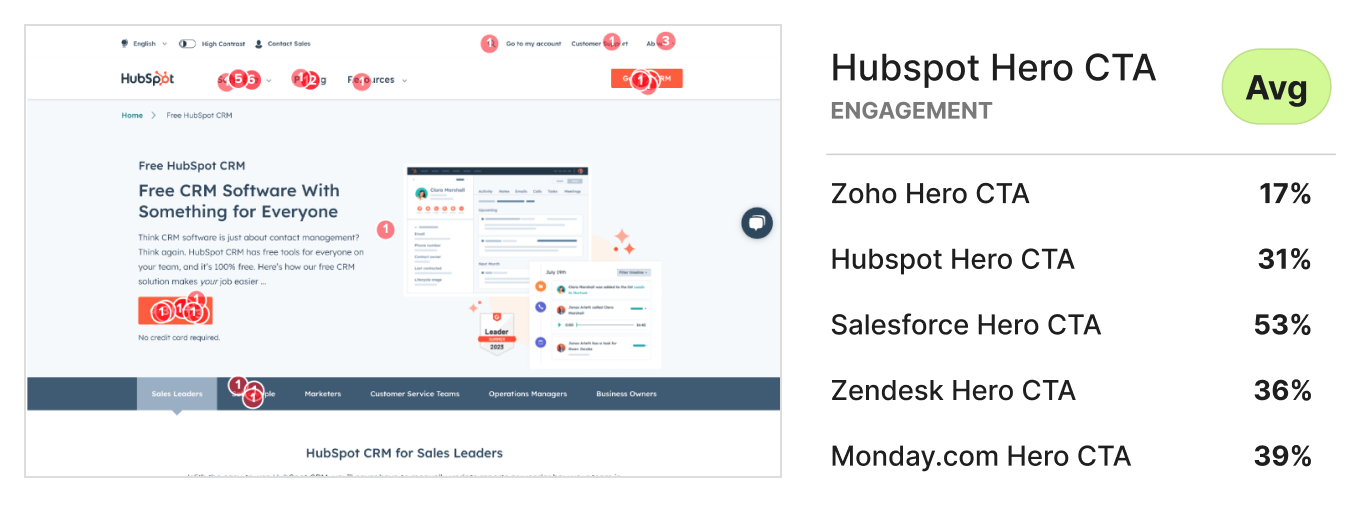
Make informed decisions about which pieces to implement.
Best Practices for UX Label Design
Now that we understand the importance of UX labels and the process of creating them, let’s dive into some best practices to keep in mind when designing your labels.
Consistency in UX Labeling
Consistency is key in UX label design. It’s important to use consistent language and visual styling across your product to avoid confusing users. By keeping labels consistent, you help users build mental models and navigate your product more effortlessly.
The Balance Between Creativity and Clarity
While it’s important to be creative in UX label design, clarity should always take precedence. Avoid sacrificing clarity for the sake of aesthetics or creativity. Remember, the primary goal of a label is to communicate function and purpose, so make sure your labels are clear and easy to understand.
The Future of UX Labels
As technology continues to evolve, so too will UX label design. Let’s explore some emerging trends that are shaping the future of UX labels.
Emerging Trends in UX Label Design
With the rise of voice assistants and natural language processing, we can expect to see an increase in conversational UX labels. Labels that mimic natural language and respond to user queries contribute to a more personalized and human-like user experience. Additionally, the use of microinteractions and animations in labels can add an extra layer of interactivity and delight to the user experience.
How AI and Machine Learning are Influencing UX Labeling
The advancements in AI and machine learning are revolutionizing the way we approach UX label design. These technologies can analyze user behavior and preferences, allowing for dynamic and personalized labels that adapt to each user’s needs. As AI continues to improve, UX labels will become even more context-aware and tailored to the individual user.
In conclusion, understanding the importance of UX labels and how to design them effectively is crucial for creating exceptional user experiences. By following the characteristics of effective labels, employing user-centered design processes, and staying up-to-date with emerging trends, you can ensure that your UX labels enhance user engagement and contribute to a seamless digital experience. So, don’t underestimate the power of these small pieces of text – they have the potential to make a big impact on your product’s success.
UX Labels FAQs

UX labels refer to the small pieces of text used to describe buttons, links, or other interactive elements in digital products. They guide users and provide clarity on the function of specific elements.
UX labels improve usability by providing clear instructions or descriptions of what an action or element does. This reduces user confusion, enhances navigation, and creates a seamless user experience.
A good UX label is clear, concise, and action-oriented. It uses simple language that is easy to understand and accurately describes the purpose of the element it’s attached to.
To maintain consistency, use the same terminology and tone across the entire product. Labels should align with the overall brand voice, helping users navigate without confusion.
UX labels are critical for accessibility, especially for users relying on screen readers. Clear, descriptive labels ensure that all users, including those with disabilities, can navigate and interact with the product effectively.
A/B testing allows designers to test different label variations with real users, gathering data on which labels are most effective. This helps refine labels for better user engagement and understanding.
AI and machine learning enable dynamic UX labels that adjust to user behavior, preferences, and context. These technologies can personalize labels to make interfaces more intuitive and user-friendly.